The menu-bar popover
The popover is the fast path. Start or stop a worktree, open its app, reset its database, or jump into the manager, without leaving whatever you were doing.
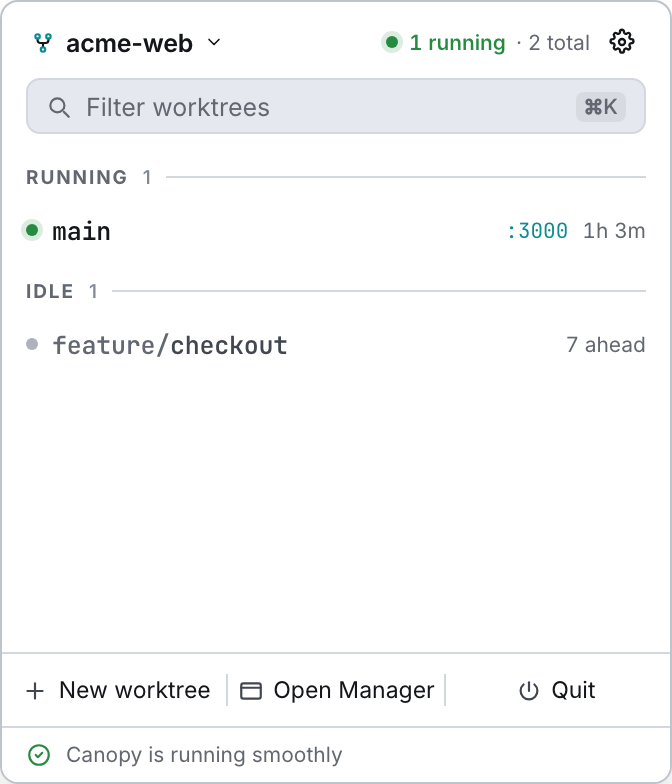
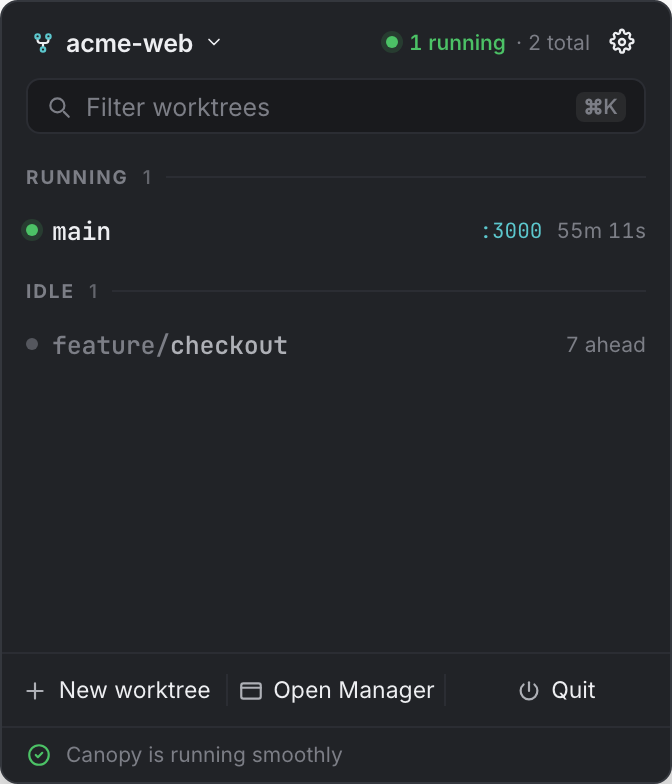
Opening it#
| Platform | How |
|---|---|
| macOS | Click the tray icon. The popover is a non-activating NSPanel: it doesn't steal focus, it floats over full-screen apps, and it hides when it loses key status. |
| Linux / Windows | Click the tray icon, which here is a regular borderless always-on-top window. The icon also carries a menu with Open Canopy and Quit Canopy, since Linux tray backends don't deliver click events. |
On macOS the panel is positioned by hand from the tray icon's rectangle: centred under it, hanging below the menu bar with a small gap.
Header#
The repository picker shows the current repo's name, and the popover shows one repository at a time. It's disabled when you only have one; otherwise it opens a list. Beside it, a summary reading N running · M total, or just the worktree count when nothing is running. The gear opens Settings (⌘,) by showing the main window and opening Settings there.
The filter matches branch names and highlights the match in the row. ⌘K focuses it and Esc clears it.
Rows#
Worktrees are grouped by state: Running, Starting, then Idle (titled Matches while you're filtering). Each row shows:
| Part | Notes |
|---|---|
| Dot | green running · red a service crashed · amber starting · faint idle |
| Branch | An owner/ prefix recedes visually so the meaningful tail stays readable. |
| Meta | Running: a crash count, the primary service's port, and its uptime. Idle: N ahead, or idle. Starting: starting… |
| Actions | Depend on the state, see below. |
The "primary" service behind the port and uptime is the first web service with a port, failing that the first service with a port, failing that the first service.
Row actions#
| State | Actions |
|---|---|
| Running (or crashed) | Open in browser · Terminal · Reset database · Stop |
| Starting | Terminal · Reset database · Cancel start |
| Idle | Open in editor · Terminal · Start |
Clicking the row itself selects that worktree and opens the main window.
Keyboard#
| Key | Action |
|---|---|
↑ ↓ | Move the cursor through the visible rows. |
⏎ | Start the highlighted worktree if it's idle, otherwise focus it in the manager. |
⌘K | Focus and select the filter field. |
⌘N | New worktree, which shows the main window and opens the dialog there. |
⌘, | Settings, same route. |
Esc | Clear the filter. |
| any other key | Focuses the filter, so you can just start typing. |
Moving the mouse drops keyboard mode, so the hover highlight and the keyboard cursor never fight each other.
Footer#
New worktree opens the dialog in the main window. Open Manager shows the main window on the overview. Quit stops every service Canopy started, then exits.
Below that sits a health line reporting real state:
| Condition | Line |
|---|---|
| Any service exited unexpectedly | N services stopped unexpectedly (amber) |
| Something is running | Canopy is running smoothly (green) |
| Nothing is running | No services running |
The app version sits at the right of that line.
How the popover talks to the main window#
Creating a worktree, the overview and Settings all live in the main window. The popover shows that window and emits a command (tray:new-worktree, tray:overview, tray:settings) which the main window listens for and turns into the right surface. It doesn't try to reimplement those screens.